
NAVIORA Individual

NAVIORA Individual

Never Lose Your Way Back.

Your personal location companion. Save the places that matter, record your journeys, and return whenever you need to, along the exact path you took or by the shortest route.

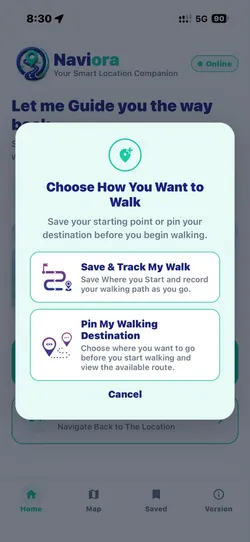
NAVIORA app: Choose How You Want to Walk, with Save & Track My Walk and Pin My Walking Destination
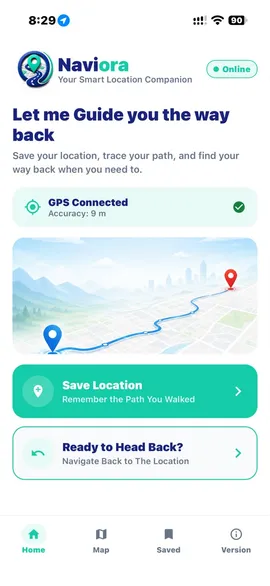
NAVIORA app home screen: Let me Guide you the way back, GPS connected, Save Location and Ready to Head Back?

Screens from the NAVIORA app

Walking only, for now

The current version of NAVIORA Individual supports walking journeys only. Saving places, recording your path, retracing it and the shortest walking route are designed and tested for travel on foot. Vehicle-based features, such as driving, are planned for a future version and are not available yet.

Sound familiar?

Finding your way back shouldn't depend on memory.

NAVIORA Individual remembers the places and paths that matter, so getting back is simple.

  1. Where did I park?

    A multi-storey car park, a festival field, a street you have never been to. Places are easy to lose.

  2. Which way did I come?

    Turns blur together in unfamiliar areas, and retracing your steps from memory is guesswork.

  3. How do I get back?

    Sometimes you want the exact way you came. Sometimes you just want a better way back.

Key features

Everything you need to get back.

All features
  • 01

    Save and Pin Locations

    Save important current locations with one tap or select custom coordinates directly from the map for future reference.

  • 02

    Route Recording

    Record your journeys continuously using the application's real-time location-tracking functionality.

  • 03

    Same Path Navigation

    Return by following your previously recorded route step-by-step, helping you retrace the exact journey you originally travelled.

  • 04

    Shortest Path / Optimized Route

    Obtain a fast, optimized route to your selected destination instead of following the original recorded path.

  • 05

    Location and Route Management

    Easily view, search, rename, and manage all of your saved locations and recorded journeys in one organized library.

Two ways back

Retrace your steps, or take a better route.

When it is time to return, you choose how. Both options lead to the same place.

Option 1

Retrace your recorded route

Go back along exactly the path you recorded, with every street and turn you took on the way there.

A good choice when

  • You want the familiar way you came
  • The route you took matters to you
  • You prefer no surprises on the way back

Option 2

Take the shortest route

Head to the same destination by the shortest available walking route, instead of repeating every turn of the original journey.

A good choice when

  • The way you came was not the most direct
  • You just want to get back efficiently
  • You would rather not repeat every turn

How it works

From saved place to the way back, in six steps.

See the full walkthrough
  1. Step 01

    Open NAVIORA

    Launch the NAVIORA application on your phone.

  2. Step 02

    Save a place

    Save or pin an important location you want to come back to.

  3. Step 03

    Record a journey

    Record a journey when required, so the path you take is kept.

  4. Step 04

    Choose where to go

    Select a saved location or one of your recorded routes.

  5. Step 05

    Pick your way back

    Choose to retrace your recorded walking path or take the shortest walking route.

  6. Step 06

    Arrive

    Follow the selected route to reach your destination.

Download

Get NAVIORA Individual on your phone.

Install the app, save your first place, and you will always have a way back.